ChatWall - Anonymise & Mask Private Data (PII) in AI LLM prompts : ChatGPT, Claude, Gemini, Grok etc.
ChatWall is a browser extension that acts as a privacy firewall between you and AI providers (ChatGPT, Claude, Gemini, etc.). It automatically detects and anonymizes private and sensitive data (PII) like names, emails, phone numbers, and bank details before they leave your browser.
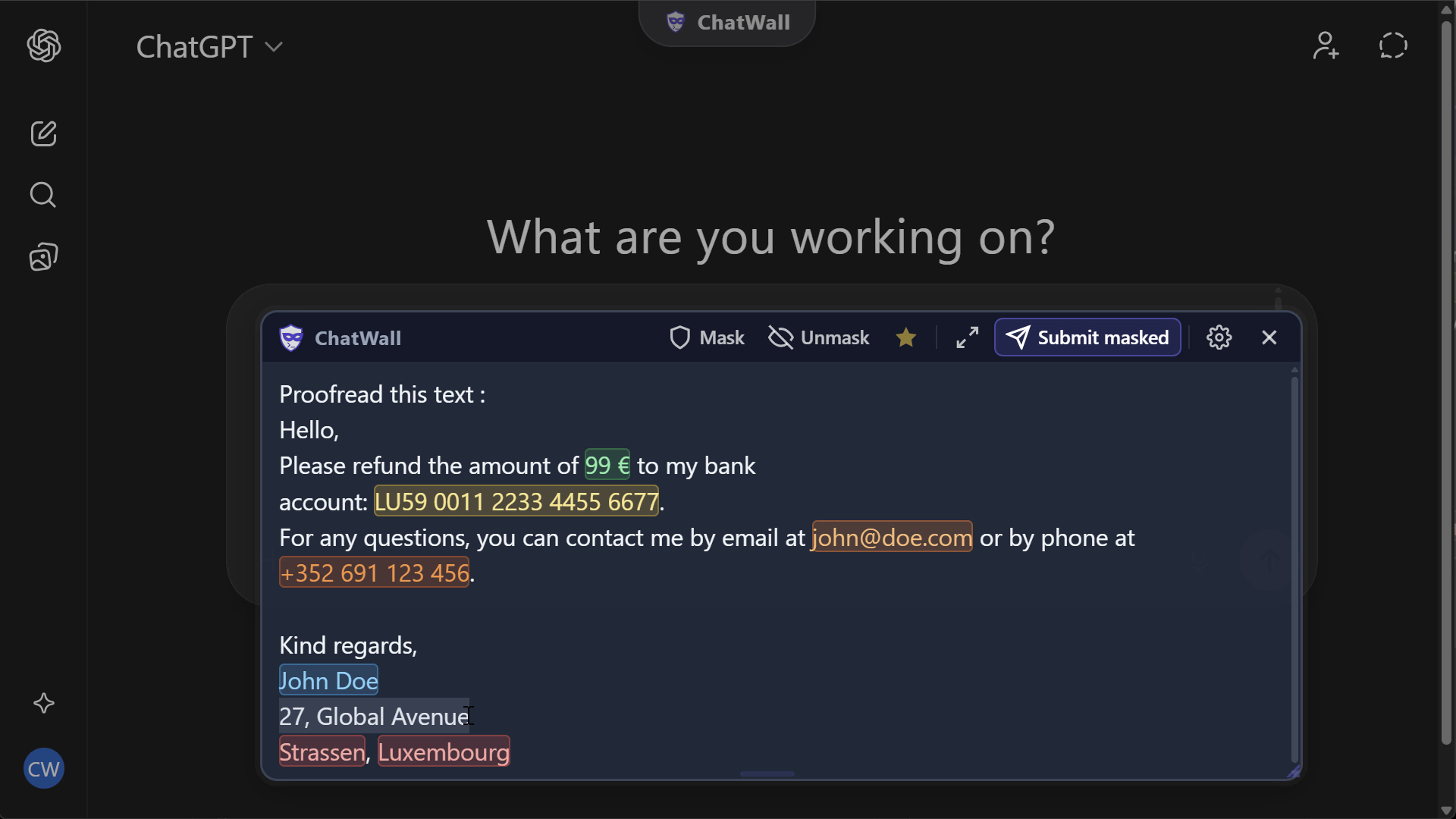
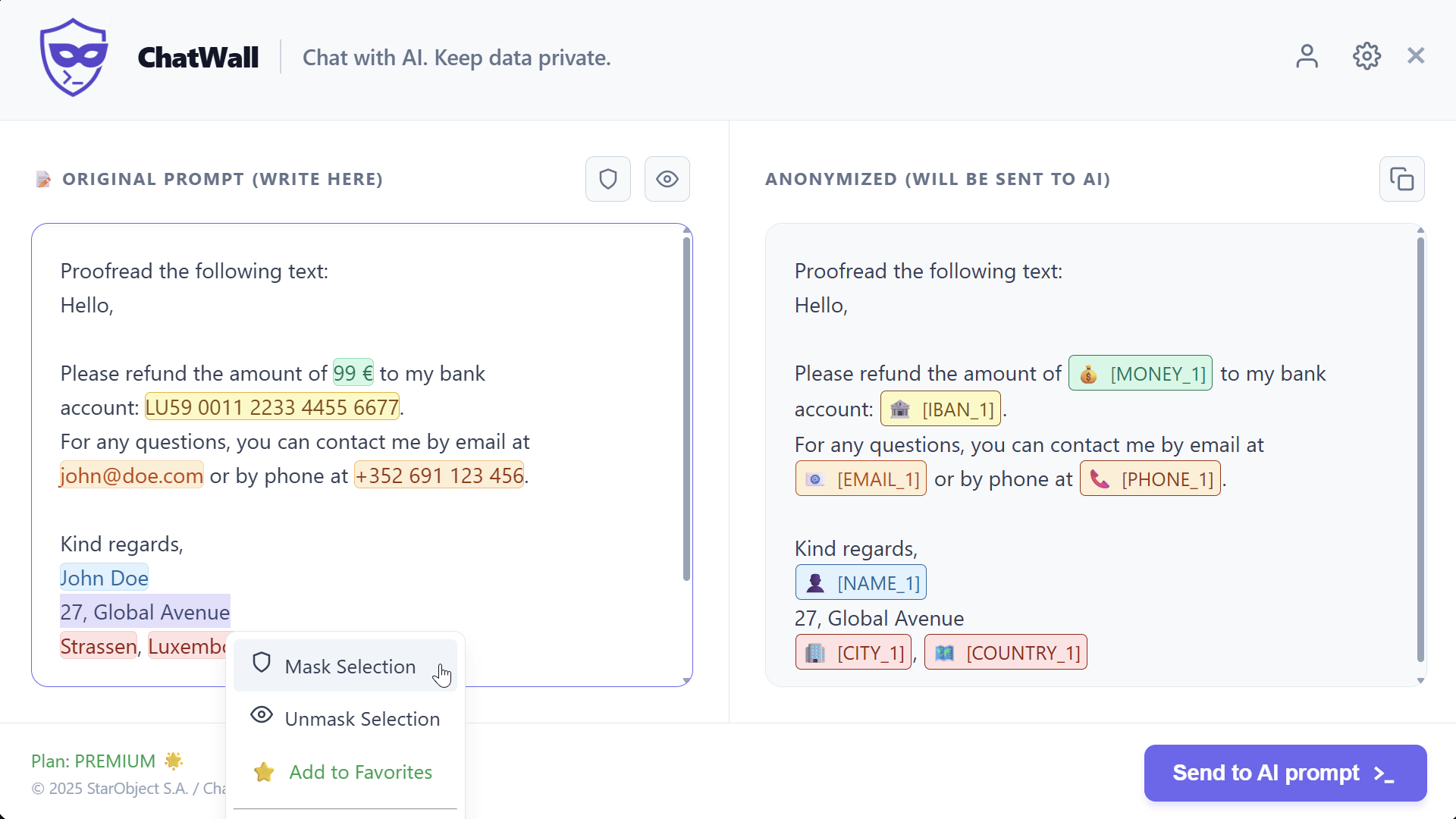


- Local Processing: All detection and masking happens 100% inside your browser. No PII is ever sent to our servers.
- Smart Detection: Identifies 30+ types of PII including Names, Emails, Phones, IBANs, Credit Cards, API Keys, JWTs, and more.
- Secure Overlay: A Shadow DOM isolated environment to type your prompts safely, preventing the host website from "seeing" what you type until you choose to send the masked version.
- Context-Aware: Understands context (e.g., "Call John" vs just "John") for accurate name detection.
- Multi-Language: Supports 7 languages (EN, FR, ES, DE, IT, NL, PT).
ChatWall is built on a "Local First" architecture to maximize privacy.
- Local NLP Engine: A JavaScript-based detection engine (
detectors/*.js) that uses advanced Regular Expressions and Contextual Logic (not heavy ML models) to detect PII with near-zero latency. - Shadow DOM Overlay: The UI is injected into a
Shadow Root(mode: closed), isolating your input from the host page's scripts and DOM. This prevents the AI provider from using keyloggers or screen scrapers on your sensitive drafts. - Ephemeral Token System:
- Detection:
John Doe-> Detected asNAME. - Tokenization: Replaced with
[NAME_1]. - Storage: The mapping (
[NAME_1]: John Doe) is stored inchrome.storage.session(RAM-like). - Lifecycle: Tokens are Session-Bound. Closing the tab wipes the key. We strictly do not persist PII to disk.
- Detection:
- Secure Favorites: Custom favorite terms (words you want always masked) are stored locally in Chrome Storage (base64 encoded) to persist across sessions. They are not synced to the cloud.
⚠️ Favorites are stored locally on your device. Do not add sensitive data to favorites on a public or shared computer.
- Input: User types in Secure Overlay.
- Process: Text is scanned -> PII replaced with Tokens -> Mapping stored in Memory.
- Output: Masked text (
[NAME_1] asked about [PROJECT_X]) is injected into the AI Chatbox. - Response: When AI replies with tokens (
[NAME_1]), ChatWall detects them and offers a "Click to Unmask" feature using the local in-memory map.
content/: Modular content scripts, loaded in order viamanifest.json. All files share a global scope (no bundler needed).01_variables.js– Global state, constants, entity tiers, SVG assets.02_storage.js– Token map, counters, favorites, plan persistence.03_utils.js– DOM helpers, text extraction, button detection, token locking.04_processing.js– Core text analysis, scoring, overlap resolution, rendering.05_masking.js– Outbound masking flow: tokenize → send to AI prompt.06_unmasking.js– Inbound unmasking flow: detect tokens → restore originals.07_overlay_ui.js– Overlay lifecycle (create / show / hide), toasts, plan UI.08_float_button.js– Floating button, risk analysis, decision popup, unmask guide.09_overlay_events.js– Overlay interaction (input, toolbar, scroll sync, settings, license).10_context_menu.js– Right-click context menu (cut, copy, paste, mask/unmask, favorites).11_page_events.js– Chrome messages, typing detection, focus/click bootstrap, MutationObserver.12_mode_menu.js– Mode menu UI: Editor Masking, Inline Masking and Always-On toggles; persists user mode preference viachrome.storage.local.13_input_overlay.js– Inline (integrated) overlay: shadow-DOM panel injected directly over the native AI input. Handles auto-resize, paint-to-mask/unmask, "Mask with ChatWall" re-open badge, and send-masked flow.14_response_redact.js– Response token redaction: scans AI reply nodes for[TYPE_N]placeholders and replaces them with interactive colour-coded pills. Hold to reveal the original value inline.
detectors/: Contains the detection modules.detector.js: Base class for logic.name.js,email.js, etc.: Specific implementation rules._data/: Datasets (Names, Cities) loaded dynamically to save memory.
_locales/: Internationalization files (messages.json).manifest.json: V3 Manifest defining permissions and host matches.
- Install: Install ChatWall from the Browser Web Store (https://chatwall.io/index.html#download) or load the extension folder in Chrome (
chrome://extensions-> Load Unpacked). - Masking:
- Go to a supported site (e.g.,
chatgpt.com). - Click the ChatWall Logo in the input bar.
- Type your confidential prompt in the Overlay.
- Click "Send to AI Prompt".
- Submit the masked prompt to the AI.
- Go to a supported site (e.g.,
- Unmasking:
- If the AI mentions a token (e.g.,
[NAME_1]), ChatWall highlights it. - Click the Floating Unmask Green Button to reveal the original text.
- Or Right-Click the Copy Button of the response.
- Or Right-Click ->
ChatWall->Unmask & Copy.
- If the AI mentions a token (e.g.,
📖 Full Documentation: chatwall.io/support
- Zero-Knowledge: We do not know who you are masking or what you are typing.
- No Analytics on Content: We do not track prompt content.
- License Validation: The only network request made to
chatwall.iois to validate your License Key (if Premium). This sends your email, anonymous ID and License Key. - Open Source-ish: The code is inspectable. To verify that no data leaves your machine, open
chrome://extensions, find ChatWall, and click "Inspect views: service worker" — the Network Tab there shows the extension's only external request (license validation). In the browser DevTools (F12), you may seechrome-extension://requests — these are the extension loading its own local UI files. Any other requests (analytics, telemetry, etc.) originate from the website itself (ChatGPT, Gemini, etc.) and are not related to ChatWall.
- Fork the repository.
- Create a branch from
developfollowing the naming convention below. - Make your changes and commit using conventional commit messages.
- Submit a Pull Request targeting
develop.
Branches must follow the pattern type/issue-number-short-description, where type matches one of the issue templates:
| Type | Description | Branch Example |
|---|---|---|
feat |
New feature or enhancement | feat/12-add-iban-detector |
fix |
Bug fix | fix/34-overlay-scroll-desync |
refactor |
Code restructuring (no behavior change) | refactor/7-split-content-modules |
perf |
Performance improvement | perf/45-optimize-large-text |
style |
Code style / formatting | style/51-lint-detectors |
test |
Adding or updating tests | test/60-name-detector-cases |
docs |
Documentation changes | docs/18-update-readme |
chore |
Maintenance, deps, build tasks | chore/22-update-manifest-version |
Commits must use Conventional Commits format:
type: short description

# Examples
feat: add GPS coordinate detector
fix: prevent overlay from closing on outside click
refactor: extract honorific list into shared module
perf: cache DOM queries in overlay rendering
- Create your detector file in
detectors/(extendContextualDetectorfromdetector.js). - Register it in both
manifest.jsonandmanifest.firefox.json. - Instantiate it in the
DETECTORSarray inbackground.js.
Note: Detectors must use strictly local logic (Regex/Algorithmic). No API calls allowed.
Proprietary / Source Available Copyright © 2025 StarObject S.A. - Philippe Collignon. All Rights Reserved.
- Allowed: View source code for security auditing; Modify for personal use.
- Prohibited: Resale, redistribution, commercial use, or uploading to extension stores.
See License.txt for details.