██╗███╗   ██╗██████╗  ██████╗ ██╗  ██╗██╗     ██╗   ██╗
██║████╗  ██║██╔══██╗██╔═══██╗╚██╗██╔╝██║     ╚██╗ ██╔╝
██║██╔██╗ ██║██████╔╝██║   ██║ ╚███╔╝ ██║      ╚████╔╝
██║██║╚██╗██║██╔══██╗██║   ██║ ██╔██╗ ██║       ╚██╔╝
██║██║ ╚████║██████╔╝╚██████╔╝██╔╝ ██╗███████╗   ██║
╚═╝╚═╝  ╚═══╝╚═════╝  ╚═════╝ ╚═╝  ╚═╝╚══════╝   ╚═╝
Inboxly is an AI-native email + calendar client. Instead of clicking through menus, you just tell it what you want — “summarize my latest 5 emails”, “reply to Priya and attach the deck”, “move my 3pm to 4pm and add a Meet link” — and it does it across Gmail and Google Calendar in one calm workspace.
🌐 Live App → inboxly.fun · ⚙️ API → inboxly-3cfo.onrender.com






📖 Architecture · 🔐 Security · 🤝 Contributing
- Demo & Walkthrough
- The Problem
- The Solution
- Feature Highlights
- How It Works (Architecture)
- The AI Agent
- Tech Stack
- API Reference (Routes)
- Data Model
- Plans, Usage & Billing
- Real-Time Sync
- Project Structure
- Local Development
- Configuration (Environment Variables)
- Authentication (Clerk)
- Connecting Gmail & Calendar (Corsair)
- Deployment
- Quality: Lint, Type-check & Tests
| 📺 Product Demo | 🚀 Y Combinator Pitch |
|---|---|
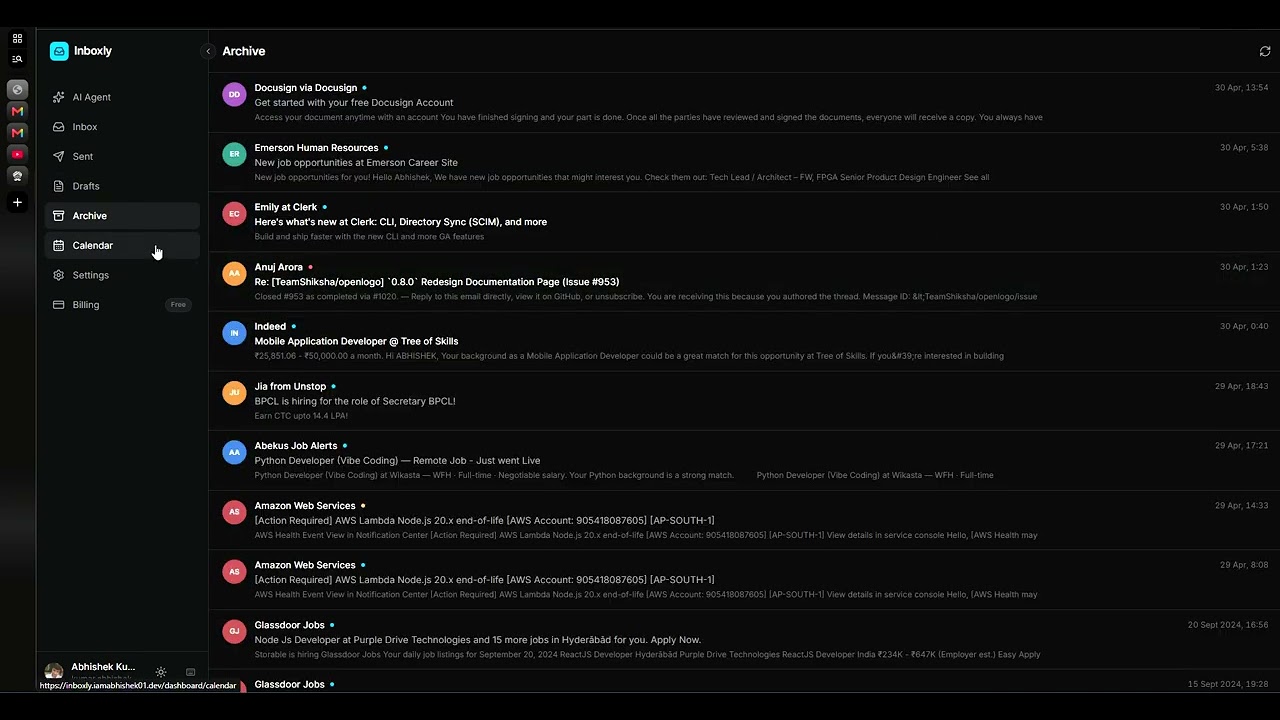 |
 |
| ▶ Watch the demo | ▶ Watch the YC short |
Email and calendar are where work actually happens — and they’re exhausting.
- Too many tabs, too much context-switching. Replying to one email means jumping between the thread, your calendar, and a half-written draft.
- Triage is manual. You scan dozens of subjects to find the two that matter today.
- Drafting is slow. Even a three-line reply takes formatting, tone, and a "where did that invoice go?" search first.
- Scheduling is a negotiation. Creating an event from an email is copy-paste-copy-paste, then a Meet link, then invites.
- Search is keyword-brittle. If you don’t remember the exact words, you don’t find the email.
The tools are powerful but dumb about intent. You know what you want; you just don’t want to do the ten clicks to get there.
Inboxly puts a single AI agent in front of your Gmail and Google Calendar. You type a request in plain English and the agent decides which tools to call — search, summarize, reply, draft, archive, schedule, reschedule, cancel — and executes them against the real Google APIs, then reports back.
What makes it feel different:
- One prompt box, full reach. The same assistant reads your inbox, writes and sends (or drafts) email with attachments, and manages your calendar — no mode switching.
- Semantic search, not keyword search. Every synced email is embedded (
text-embedding-3-small) and stored with apgvectorHNSW index, so “the email about the roadmap from Priya” finds the right message even when you misremember the words. - A real local cache. Inbox, Sent, Archive, and Drafts are read from a synced Postgres cache — fast lists, consistent answers — kept fresh by Gmail/Calendar push notifications, not polling.
- It tells you the truth. When a tool fails (attachment too large, missing recipient, send error), the agent surfaces the actual error instead of silently failing — and treats your next message as a fresh retry with full context.
- It’s a polished product, not a demo: auth, onboarding, integrations management, subscription plans with usage metering, Razorpay checkout, real-time UI updates, and a hand-tuned UI.
| Feature | What it does | |
|---|---|---|
| 🤖 | Conversational agent | One chat drives email + calendar via OpenAI tool-calling (8 tools, multi-step). |
| 📝 | Send / draft / reply | Composes Markdown → clean multipart HTML email, threads replies (In-Reply-To/References), or saves a Gmail draft for review. |
| 📎 | Attachments | Files attached in the prompt box ride along on the next send — RFC-822 multipart/mixed, with per-plan size caps. |
| 🔍 | Semantic email search | Vector search over your synced inbox (pgvector + HNSW), with a cheap-LLM relevance layer. |
| 🗂️ | Inbox / Sent / Archive / Drafts | Full mail views read from a local Postgres cache, date-sorted, paginated. |
| 📅 | Calendar agent | Create, search, update/reschedule, and delete events; resolves relative dates ("next Tuesday 3pm") against the user’s timezone; optional Google Meet links and attendees. |
| ⚡ | Real-time sync | Gmail (Pub/Sub) and Calendar (events.watch) push changes → server re-syncs → UI updates live over SSE. |
| 🔐 | Auth & onboarding | Clerk (Google OAuth + email/password), guided onboarding to connect Google services. |
| 💳 | Plans & billing | Free vs. Pro, server-authoritative usage metering, Razorpay checkout, usage resets on plan switch. |
| 🎨 | Crafted UI | Next.js 15 + React 19 + Tailwind v4, spotlight cards, typewriter chat stream, command/shortcut modal, dark theme. |
                         ┌─────────────────────────────────────────────┐
                         │                inboxly.fun                  │
                         │      Next.js 15 · React 19 · Tailwind v4     │
                         │   Zustand stores · Clerk · SSE listeners     │
                         └───────────────┬─────────────────────────────┘
                                         │  HTTPS (Bearer JWT)
                                         ▼
            ┌────────────────────────────────────────────────────────────────┐
            │             inboxly-3cfo.onrender.com  (Express API)            │
            │                                                                  │
            │  routes → controllers → services → models → db                   │
            │                                                                  │
            │  ┌── chat.service ──────────────┐   ┌── email/calendar.service ─┐ │
            │  │ OpenAI tool-calling loop     │──▶│ Corsair Gmail/Calendar    │ │
            │  │ (search/send/draft/schedule) │   │ plugins (api + db cache)  │ │
            │  └──────────────────────────────┘   └───────────────────────────┘ │
            └───────┬───────────────────────┬───────────────────────┬──────────┘
                    │                       │                       │
              ┌─────▼─────┐          ┌──────▼──────┐         ┌───────▼───────┐
              │  OpenAI   │          │  PostgreSQL  │        │ Google APIs    │
              │ chat +    │          │  + pgvector  │        │ Gmail/Calendar │
              │ embeddings│          │ corsair_* +  │        │ (via Corsair)  │
              └───────────┘          │ drizzle      │        └───────┬───────┘
                                     │ tables       │                │ push
                                     └──────────────┘        ┌───────▼───────┐
                                                             │ Pub/Sub +     │
                                                             │ events.watch  │
                                                             │ → /webhooks/* │
                                                             └───────────────┘
Backend layering (apps/api/src/): routes/ wire URLs + middleware → controllers/ parse the request and shape the response → services/ hold business logic → models/ run DB queries (Drizzle) → db/ holds schema + migrations. Cross-cutting concerns live in middleware/ (Clerk auth, Zod validation, error handling), lib/ (OpenAI, Corsair, Postgres singletons), and validations/ (Zod schemas). Request/response types are shared via packages/shared, so the web app and API never drift.
Google access goes exclusively through Corsair — a self-hosted SDK embedded in the API process that owns OAuth, token encryption, an entity cache, and a webhook event log. Each Inboxly user is a Corsair tenant (tenantId = String(users.id)). The app never calls googleapis directly for mail/calendar data operations — everything is corsair.withTenant(...).gmail.* / .googlecalendar.*. (The only raw Google calls are the push-notification watch registrations.)
The heart of Inboxly is chat.service.ts — an OpenAI tool-calling loop (POST /api/chat). The model receives a rich system prompt (the user’s name/email for signatures, their local date/time and timezone, attachment context) and a set of tools, and iterates (up to 5 rounds) calling tools and reading results until it produces a final answer.
Available tools:
| Tool | Purpose |
|---|---|
search_emails |
Find emails by topic/sender (semantic) or list the most recent (mode: recent/search). |
send_email |
Send immediately via Gmail; threads replies via replyToEmailId; auto-includes prompt attachments. |
create_draft |
Save a Gmail draft for review instead of sending. |
archive_email |
Remove a message from the inbox (keeps it searchable). |
create_calendar_event |
Schedule events; resolves local date-times, supports attendees + Google Meet. |
search_calendar_events |
Query the calendar by range/keyword. |
update_calendar_event |
Reschedule/edit (merges over the existing event so omitted fields aren’t cleared). |
delete_calendar_event |
Cancel an event (confirmation-guarded). |
Design touches that make it reliable:
- Persistent, tool-aware history. Every turn — including assistant
tool_callsandtoolresults — is stored inchat_conversations/chat_messagesand replayed on the next turn, so the agent has full context. - Safe-by-default actions. It confirms or prefers drafting before sending email or deleting events unless you clearly asked to.
- Honest error handling. If a tool returns
{ success: false, error }, the agent must relay that error to you (never claim success), and a server-side safety net surfaces the error even if the model returns an empty reply. - Fresh retries. A failure on one turn never blocks the next — your follow-up ("try again", a fix, a rephrase) is treated as a fresh attempt using all prior context.
| Layer | Technology |
|---|---|
| Frontend | Next.js 15 (App Router) · React 19 · Tailwind CSS v4 · Zustand · next-themes · lucide-react · DOMPurify |
| Backend | Node ≥ 20 · Express · TypeScript (ESM) |
| AI | OpenAI SDK — chat completions (tool-calling) + text-embedding-3-small |
| Database | PostgreSQL 16 + pgvector (HNSW), via Drizzle ORM |
| Google data | Corsair self-hosted SDK (Gmail + Google Calendar plugins) |
| Auth | Clerk (Google OAuth + email/password) + Clerk webhooks |
| Payments | Razorpay (orders + signature-verified capture) |
| Validation | Zod (request schemas via validation middleware) |
| Real-time | Server-Sent Events (SSE) + Gmail Pub/Sub + Calendar events.watch |
| Observability | Sentry (API + web) |
| Monorepo | pnpm workspaces · Turborepo · ESLint · Prettier · Vitest · Husky + lint-staged |
| Infra | Docker + Docker Compose · GitHub Actions CI · Render (deploy) · ngrok (optional tunnel) |
Base URL: https://inboxly-3cfo.onrender.com/api (local: http://localhost:4000/api). Unless noted, endpoints require a Clerk Bearer token. Webhooks are unauthenticated but signature/token-verified.
| Method | Path | Auth | Description |
|---|---|---|---|
GET |
/health |
– | Liveness probe ({ status, uptime }). |
GET |
/auth/me |
✅ | Current user profile (id, email, name, image). |
| Method | Path | Auth | Description |
|---|---|---|---|
POST |
/chat |
✅ | Send a message to the agent. Body: { messages, timeZone?, conversationId?, attachments? }. Runs the tool-calling loop; returns the assistant reply, any created calendar events, the conversationId, and emailSent. Enforces the per-chat message cap (402 limit:chatDepth). |
| Method | Path | Description |
|---|---|---|
GET |
/emails |
List inbox (paginated, date-sorted, from local cache). |
GET |
/emails/search?q= |
Semantic vector search across synced mail. |
GET |
/emails/stream |
SSE stream of inbox updates. |
GET |
/emails/sent |
List Sent mail. |
GET |
/emails/archived |
List archived mail. |
GET |
/emails/drafts |
List Gmail drafts. |
GET |
/emails/:id |
Full message detail (HTML body, cc/bcc, attachments metadata). |
POST |
/emails/sync |
Sync Inbox/Sent/Archive/Drafts into the cache (+ embeddings). |
POST |
/emails/send |
Send an email (with attachments, threading). |
POST |
/emails/:id/archive |
Archive a message (removes INBOX label). |
POST |
/emails/drafts/:draftId/send |
Send an existing draft. |
DELETE |
/emails/drafts/:draftId |
Discard a draft. |
| Method | Path | Description |
|---|---|---|
GET |
/calendar |
List events (paginated). |
GET |
/calendar/search?q= |
Search events. |
GET |
/calendar/stream |
SSE stream of calendar updates. |
GET |
/calendar/:id |
Event detail. |
POST |
/calendar/sync |
Sync events into the cache. |
POST |
/calendar |
Create an event. |
PATCH |
/calendar/:id |
Update/reschedule an event. |
DELETE |
/calendar/:id |
Delete an event. |
| Method | Path | Auth | Description |
|---|---|---|---|
GET |
/integrations/google/status |
✅ | Per-plugin state: connected / missing_credentials / not_connected. |
GET |
/integrations/google/connect/:plugin |
✅ | Start OAuth (plugin = gmail | googlecalendar) — returns Google consent URL. |
GET |
/integrations/google/callback |
– | OAuth redirect target; recovers tenant from signed state, stores tokens, registers push watches. |
DELETE |
/integrations/google/:plugin |
✅ | Disconnect a plugin. |
| Method | Path | Description |
|---|---|---|
GET |
/account/subscription |
Plan, limits, usage, payment info. |
POST |
/account/upgrade |
Card-based upgrade to Pro (resets usage). |
POST |
/account/downgrade |
Downgrade to Free (resets usage). |
POST |
/account/usage/chat |
Meter a chat turn ({ newConversation }); 402 when capped. |
POST |
/account/usage/email-sync |
Meter an email sync; 402 when capped. |
DELETE |
/account |
Delete account (DB + Clerk). |
POST |
/payment/create-order |
Create a Razorpay order for Pro. |
POST |
/payment/verify |
Verify the Razorpay signature → upgrade to Pro. |
| Method | Path | Description |
|---|---|---|
POST |
/webhooks/clerk |
Clerk user lifecycle (raw-body signature verified). |
POST |
/webhooks/gmail |
Gmail Pub/Sub push → re-sync + SSE notify. |
POST |
/webhooks/calendar |
Calendar events.watch push → re-sync + SSE notify. |
Inboxly splits its schema between Corsair-owned tables (Google data + OAuth) and Drizzle-owned tables (app-specific data).
Corsair tables (apps/api/src/db/init.sql, managed by the SDK):
corsair_integrations/corsair_accounts— enabled plugins and each tenant’s encrypted OAuth connection.corsair_entities— generic synced cache of Gmail messages & Calendar events (entity_type+datajsonb). All list/detail views read from here.corsair_events— audit log of API calls and webhook deliveries, processed asynchronously.
Drizzle tables (apps/api/src/db/schema/, generate-then-migrate workflow):
users— local mirror of the Clerk user, plan/subscription state, and usage meters (chats_used,email_syncs_used).email_ai_meta— AI enrichment per message keyed byentity_id: cheap-LLM triage (priority/priority_reason) and avector(1536)embedding with an HNSW index for sub-second semantic search.chat_conversations/chat_messages— agent sessions, including tool calls/results.payments— Razorpay payment history.
Limits are server-authoritative (PLAN_LIMITS in account.service.ts) and surfaced in the Billing & Settings pages:
| Meter | Meaning | Free | Pro |
|---|---|---|---|
| Chats | Number of new chats you can start | 50 | ∞ |
| Chat depth | Messages allowed within a single chat | 5 | ∞ |
| Email syncs | Cache sync operations | 100 | ∞ |
| Attachment size | Per-file cap on outgoing email | 5 MB | 10 MB |
- Chat depth is enforced both server-side (in the chat completion path) and with a client-side pre-check, returning a clear "start a new chat" prompt at the cap.
- Switching plans resets every usage meter (folded into
setSubscription), so an upgrade or downgrade returns a fresh allowance — and the UI updates instantly because it consumes that response. - Upgrades flow through Razorpay: create order → user pays → signature verification → upgrade.
No polling. Inboxly stays live through Google push notifications:
- Gmail → Google Cloud Pub/Sub (
users.watch) →POST /api/webhooks/gmail. - Calendar →
events.watchchannels →POST /api/webhooks/calendar(requires a public HTTPSAPI_BASE_URL).
On a push, the API re-syncs the affected data and publishes an event the browser receives over SSE (/api/emails/stream, /api/calendar/stream), so lists refresh on their own. Watches are registered right after OAuth, re-registered for connected accounts on boot, and renewed twice daily before their ~7-day expiry (gmail-watch.service.ts / calendar-watch.service.ts), with per-user throttling to stay under Google’s rate limits.
.
├── apps/
│   ├── web/                      # Next.js 15 + Tailwind v4 frontend
│   │   └── src/
│   │       ├── app/              # App Router pages
│   │       │   ├── page.tsx              # Landing
│   │       │   ├── sign-in / sign-up     # Clerk auth
│   │       │   ├── onboarding            # Connect Google services
│   │       │   └── dashboard/            # Inbox, Sent, Archive, Drafts,
│   │       │       ├── inbox/[id]        #   Calendar, Settings, Billing,
│   │       │       ├── calendar          #   and the agent (dashboard root)
│   │       │       ├── settings, billing
│   │       │       └── ...
│   │       ├── components/       # landing/, dashboard/ (AgentView, ChatStream,
│   │       │                     # PromptBox, Sidebar...), inbox/, calendar/, ui/
│   │       ├── stores/           # Zustand: chat, subscription, email, calendar...
│   │       ├── hooks/            # use-attachments, use-razorpay, use-google-connect...
│   │       └── lib/api.ts        # Typed fetch client (Bearer-authed)
│   │
│   └── api/                      # Express + Postgres + OpenAI + Corsair backend
│       └── src/
│           ├── routes/           # auth, account, chat, email, calendar,
│           │                     # integration, payment, webhook, health
│           ├── controllers/      # request handlers
│           ├── services/         # chat, email, calendar, account, payment,
│           │                     # gmail-watch, calendar-watch, user
│           ├── models/           # Drizzle queries (user, chat, email, payment...)
│           ├── validations/      # Zod schemas
│           ├── middleware/       # Clerk auth, validate, errorHandler
│           ├── lib/              # openai, corsair, db client, redis
│           └── db/               # schema/, migrations/, init.sql
│
├── packages/
│   ├── shared/                   # Shared request/response TS types (single source of truth)
│   ├── eslint-config/            # Shared flat ESLint configs
│   └── typescript-config/        # Shared tsconfig bases
│
├── docker-compose.yml            # postgres (pgvector), redis, api, web, ngrok
├── turbo.json · pnpm-workspace.yaml
└── .github/workflows/ci.yml      # lint · type-check · test · build · docker
- Node.js ≥ 20
- pnpm ≥ 9 (
corepack enable) - Docker + Docker Compose (for Postgres/Redis, or the full stack)
# 1. Install
pnpm install

# 2. Configure (copy and fill in real values)
cp .env.example .env                         # docker-compose
cp apps/api/.env.example apps/api/.env        # API secrets
cp apps/web/.env.example apps/web/.env.local  # web (NEXT_PUBLIC_*)

# 3. Start Postgres (pgvector) + Redis
docker compose up postgres redis -d

# 4. Create the schema (first run, or after `docker compose down -v`)
pnpm --filter api db:migrate

# 5. Run both apps (Turborepo, parallel)
pnpm dev- Web → http://localhost:3000
- API → http://localhost:4000 (health:
/api/health)
docker compose up --build           # postgres, redis, api, web
pnpm --filter api db:migrate # once, after first postgres bootpnpm --filter api db:generate # diff schema/ → write a new SQL migration
pnpm --filter api db:migrate # apply pending migrations
pnpm --filter api db:studio # browser GUI over the DBSee .env.example / apps/api/.env.example for the full annotated list. Key ones:
| Variable | Purpose |
|---|---|
OPENAI_API_KEY, OPENAI_MODEL |
Chat + embeddings (defaults to gpt-4o-mini). |
DATABASE_URL, REDIS_URL |
Postgres (pgvector) + Redis connections. |
CLERK_PUBLISHABLE_KEY, CLERK_SECRET_KEY, CLERK_WEBHOOK_SIGNING_SECRET |
Auth + user-sync webhook. |
CORSAIR_KEK |
Key-encryption key for stored OAuth tokens (openssl rand -base64 32). |
GOOGLE_CLIENT_ID, GOOGLE_CLIENT_SECRET |
One OAuth client covering Gmail + Calendar. |
API_BASE_URL, WEB_APP_URL, CORS_ORIGIN |
Public URLs + allowed origins. |
NEXT_PUBLIC_API_URL |
API base the web app calls. |
GMAIL_PUBSUB_TOPIC, GMAIL_WEBHOOK_TOKEN, CALENDAR_WEBHOOK_TOKEN |
Push-notification wiring. |
RAZORPAY_KEY_ID, RAZORPAY_KEY_SECRET |
Payments. |
SENTRY_DSN, SENTRY_TRACES_SAMPLE_RATE |
Error tracking. |
.envfiles are gitignored — never commit real secrets.
Auth uses Clerk with Google OAuth and email/password.
- Create an app at dashboard.clerk.com; enable Google (Social Connections) and Email + Password.
- Put the Publishable and Secret keys into
apps/api/.env(and the web env). - (Optional) Add a webhook at
<public-url>/api/webhooks/clerkforuser.created/updated/deleted, and setCLERK_WEBHOOK_SIGNING_SECRET. Even without it, a localusersrow is created on first authenticated request (getOrCreateByClerkId).
All Google data access runs through Corsair (createCorsair() in apps/api/src/lib/corsair.ts), which owns the corsair_* tables. Each Inboxly user is a tenant (tenantId = String(users.id)).
- Generate
CORSAIR_KEK—openssl rand -base64 32→CORSAIR_KEK. - Create one Google OAuth client (Web application) with the Gmail API and Google Calendar API enabled, and redirect URI:
Put the client ID/secret in
<API_BASE_URL>/api/integrations/google/callbackGOOGLE_CLIENT_ID/GOOGLE_CLIENT_SECRET. - On boot,
initCorsair()registers thegmail/googlecalendarintegrations and stores the credentials encrypted withCORSAIR_KEK. - Users connect via the Connect routes (
/integrations/google/connect/:plugin); push watches are registered automatically after the OAuth callback.
For local push notifications, expose the API over HTTPS with ngrok:
docker compose --profile tools up ngrok # public URL shown in logs; inspector at :4040Inboxly runs in production on Render:
- API → https://inboxly-3cfo.onrender.com (Express service)
- Web → https://inboxly.fun (Next.js)
Both apps ship as Docker images (validated in CI). The API needs a reachable Postgres (with pgvector) and the full environment configured; the web app needs NEXT_PUBLIC_API_URL pointed at the API and matching CORS_ORIGIN on the API side. Run db:migrate against the production database whenever the schema changes.
pnpm lint         # ESLint across all packages
pnpm type-check   # tsc --noEmit across all packages
pnpm test         # Vitest (API route + service tests)
pnpm build        # Build all apps & packages
pnpm format       # Prettier
CI (.github/workflows/ci.yml) runs lint → type-check → test → build on every push/PR to main, then builds the api and web Docker images to keep the Dockerfiles honest. Husky + lint-staged format and lint staged files on commit.
Built with ☕ and a lot of tool-calls. · inboxly.fun